Objective
Anything you type into a chat, an email, or a note usually outlives the moment you send it. Messages sit on servers, get forwarded, get backed up, and stay searchable long after the conversation is over. CloakClip lets you protect the parts that matter without changing how you communicate: you “cloak” the text with a password, and what you send is an ordinary line of characters that only someone with the same password can read.
Because the result is just text, it travels anywhere text goes — no attachments, no plugins, and nothing for the person at the other end to install. They only need CloakClip and the password.
What people use it for
- Chats and DMs that your employer or the platform keeps a copy of
- Emails containing a Wi-Fi password, an API key, a licence key, or account details
- Tickets and shared documents that more people can read than you intended
- Personal notes in an app that syncs to somebody else's cloud — recovery codes, account numbers, a private journal entry, or the answer to a security question
- Anything routed through a channel you do not control, right down to leaving yourself a note in a place you would rather not trust
Features
Two tabs cover two ways of working, and everything is designed so a decrypted secret does not quietly outlive its use.
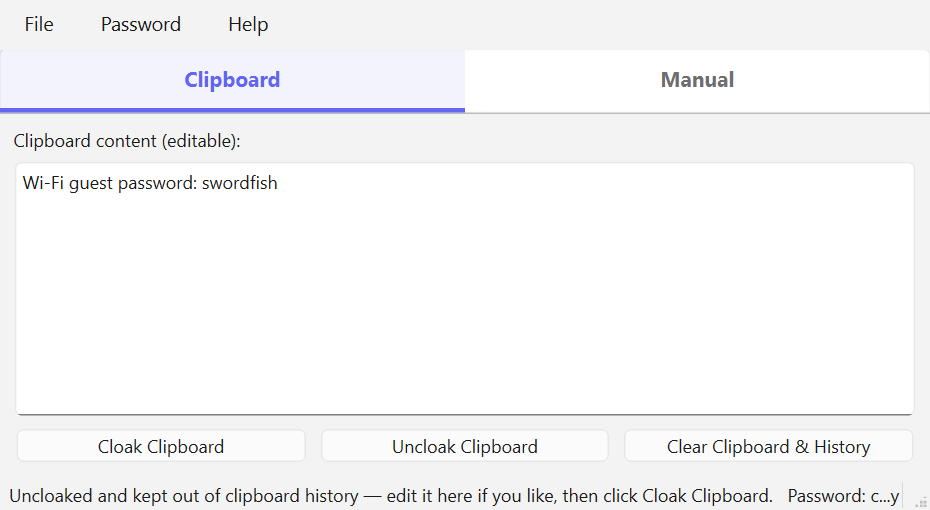
Clipboard tab — one click
- Copy any text, click Cloak Clipboard, and paste the encrypted result wherever you like
- Copy an encrypted message, click Uncloak Clipboard, and paste the original text
- The box is editable: uncloak a message, reword it in place, and click Cloak Clipboard to send your reply back — without the plain text ever leaving the app
- Clear Clipboard & History empties the clipboard and purges Windows clipboard history in one click
Manual tab — nothing touches the clipboard
- A plain-text field and an encrypted field that stay in sync as you type — no buttons to press for either direction
- Type a message and watch the encrypted version appear; paste an encrypted message and read the original above it
- Reading a message this way means the secret never reaches the clipboard at all
- Each field has its own Paste and Copy buttons, so text moves only when you say so
Keeping secrets from lingering
Windows keeps a history of everything you copy (the Win+V panel) and can sync it to the cloud, so a decrypted secret normally survives long after you paste it. CloakClip works against that:
- Decrypted text placed on the clipboard is marked secret, using the same mechanism password managers use, so Windows keeps it out of clipboard history and cloud sync — while it still pastes normally
- Text you cloak counts too: whatever app you copied it from already recorded it, so CloakClip tracks it and removes it later
- If you copy a protected text again by hand, it is re-protected automatically and the recorded copy is deleted from the history
- Closing the app clears a copied secret and sweeps the session's secrets out of the history
- Clear All! on exit — a second line of defence that empties the clipboard and purges the whole history, so nothing is left behind whether the app was tracking it or not
Passwords and comfort
- A Password menu remembers your last ten passwords, each shown only as its first and last character (
h…!) to jog your memory without revealing anything - One click reuses the last password; a password is remembered only after it actually works, so typos are never stored
- The history is encrypted with Windows DPAPI, tied to your Windows account, and can be cleared at any time
- Light and dark themes, following Windows by default with a per-app override
- The window reopens where you left it
- On Windows, an installer with a Start menu entry and no administrator rights needed — or the portable single file, with nothing to install at all
Encryption
AES-256 in CBC mode, with the key derived from your password and a fresh random initialization vector for every message — so cloaking the same text twice produces two completely different results, and nobody can tell that two messages match. Since the key derivation is a single hash rather than a slow stretching function, use a long password.
Share the password through a different channel than the message. If you email a cloaked block, do not email the password — send it by text, say it in a phone call, or hand it over in person. Both halves in the same place means no protection at all.
Download
Free standalone application for Windows and macOS — nothing else needs to be installed for it to run.
Download for Windows Download for macOS Source on GitHubBoth buttons bring you to the GitHub release page: scroll down to the Assets section. For Windows, click CloakClipSetup-version.exe to install it properly, with a Start menu entry, an optional desktop shortcut and no administrator rights needed — or CloakClip.exe to run a single file without installing anything. For macOS, click CloakClip-macos.zip.
Windows may show a SmartScreen notice on first run because the download is unsigned; choose “More info”, then “Run anyway”. On macOS, right-click the app and choose “Open” the first time.
The clipboard-history protections described above are specific to Windows. The macOS version encrypts and decrypts exactly the same way, and tells you plainly which protections it cannot yet provide rather than implying it has them.
 Visit the CloakClip Site
A quick start guide and the full user manual, tab by tab.
All DownloadsThe Windows installer and portable executable, and the macOS app, with the notes for each version.
Read the ManualAlso inside the application, on the Manual tab.
Support This Work
CloakClip is free, has no ads, collects nothing about you, and never sends your text anywhere — everything happens on your own machine. That is the way privacy tools ought to work, and it is also why they are hard to sustain: there is no data to sell and no subscription to bill, so nothing pays for the work behind them.
Small tools like this take real time to build and, more importantly, to keep alive. Operating systems change, security behaviour changes underneath them, bugs surface in real use, and features get added because someone asked. A donation, however small, is what makes that continued attention possible — and it directly funds the next free tool as well as the upkeep of this one.
If CloakClip saved you a worry or a wasted hour, please consider chipping in. It genuinely makes the difference between a project that keeps improving and one that quietly stops.
DonateSecure payment through PayPal — no account required, and any amount is appreciated. Thank you for supporting independent, privacy-respecting software.