Objective
Each prediction market site shows you its own positions, in its own words, on its own page. A wager that closes slips off into a history list you have to go looking for, and neither site can tell you the one thing you actually want to know: how you are doing across both of them.
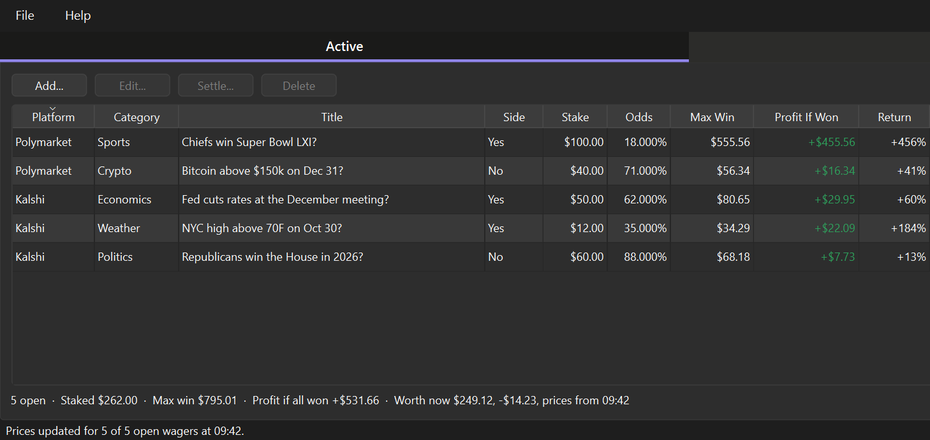
Wager Book is the record the sites do not keep for you. One table holds every wager from both platforms side by side — what you staked, the odds you got, the most it can pay, what it is worth today, and, once it is over, what it really paid. It is a book you keep, not an account you log into.
Who it is for
- Anyone with wagers on both Kalshi and Polymarket, tired of adding two portfolio pages together in their head
- Anyone who wants an honest running total — win rate and realised profit or loss across everything closed, not just what is open today
- People who keep records for tax time, for a spreadsheet, or simply to see whether a hunch has actually been paying
- Anyone who would rather their betting history lived on their own machine than only on somebody else’s servers
Features
Two tabs, one book
- Active — every open wager with platform, category, title, side, stake, odds, max win, profit and return if it wins, fees, the current price and what it is worth now, plus the dates it was placed and closes
- History — every closed wager with its result, the payout, the realised profit or loss and the return
- A totals line under each table: open exposure and max win on one side; count, win rate and net profit or loss on the other
- Sorting works on the real values, not the formatted text, so money and percentages order correctly
Prices that update themselves
- Update Prices (F5) asks both sites what each open wager could be sold for right now — the best bid for the side you hold — using their public market data
- It runs off the interface thread, so the window stays usable while it works
- Paste a market’s web address into the Ticker field and the app reads the platform and the market id straight out of it, rather than making you find them
Adding, settling, correcting
- The Add / Edit dialog works the contracts, max win and profit out as you type
- Settle fills in the usual payout for Won, Lost, Sold or Voided and still lets you correct it, because the usual answer is not always the right one
- Reopen undoes a settlement made by mistake
Bring in what you already have
- Import CSV reads a Kalshi download, a Polymarket activity export, or this app’s own CSV
- It shows you what it will add before it adds it, skips rows already in the book, and lists any row it could not read together with the reason
- Export CSV sends the whole book back out again, for a spreadsheet or an accountant
The book is yours
Everything lives in a single readable JSON file in your own application data folder — not in the install folder — so upgrading or uninstalling never touches your wagers. It is rewritten whole through a temporary file on every change, so a crash mid-write leaves the previous book intact rather than a half-written one.
There is no account and no sign-in, nothing about you is collected, and the only thing that ever leaves your machine is a request for public market prices when you press Update Prices. The app never sees your platform logins, because it never asks for them.
What it is not
Wager Book does not place wagers, connect to your accounts, or tell you what to bet on. It records what you have already done and does the arithmetic on it. Nothing here is betting advice, and a running total of past results is a record of the past, not a prediction.
Download
Free, and you do not need Python or anything else installed. Version 0.8.2.
Download for Windows Download for macOS Source on GitHubBoth buttons bring you to the GitHub release page: scroll down to the Assets section. On Windows take wagerBookSetup-0.8.2.exe to install it, or WagerBook-0.8.2-portable.zip if you would rather unzip a folder and run WagerBook.exe from anywhere. On macOS take WagerBook-0.8.2-macos.zip, unzip it and drag WagerBook.app to Applications.
The Windows installer is per-user, so it asks for no administrator rights and installs nothing machine-wide. On macOS the bundle is not notarised, so right-click the app and choose “Open” the first time rather than double-clicking. Every build is produced by a public workflow straight from the source, and is asked whether it kept its icon, its manual and its certificate list, and whether it can still open its own window, before it is published — the certificate list because a bundle that lost it would look fine until Update Prices failed as though both sites were down.
 Visit the Wager Book Site
Screenshots, the manual and the downloads.
All DownloadsInstaller, portable zip and the macOS app.
Read the ManualIncluding the arithmetic. Also on F1 inside the application.
Support This Work
Wager Book is free and open source. There is no licence to buy, no account to make, no ads, and nothing about you is collected or sent anywhere. That is also why software like this is hard to sustain: there is no subscription to bill and no data to sell, so nothing pays for the work behind it.
A book of money owed and money won has to be right, and it has to keep being right. Two sites change their market data without warning, a payout rule turns out to have an exception, a CSV export gains a column, and an app that quietly got the arithmetic wrong would be worse than no app at all. That is why the import shows you every row before it adds it, why settling proposes the usual payout but still lets you correct it, and why the book is written in a way that survives a crash halfway through. A donation is what pays for that kind of care, and it funds the next free tool as well as the upkeep of this one.
If this gave you a straight answer about how you are actually doing, please consider chipping in.
DonateSecure payment through PayPal — no account required, and any amount is appreciated. Thank you for supporting independent, open source software.